Before I tell you more about how I built SCOTUSWatch, I should tell you more about how this relates to my own practice. My practice encompasses a wide array of regulatory, litigation, and appellate matters, with a particular focus on administrative law and telecommunications. Over the course of my career, I have argued more than 50 appeals, including in the U.S. Supreme Court, 12 federal courts of appeals, as well as in five state appeals courts and two state supreme courts.
I should also tell you that, while I've always been interested in technology, my coding skills stopped with BASIC and Pascal in elementary school, working on an Apple IIe and Commodore 64. When I started this project, I was not — and still am not now — in any meaningful sense a developer. That, as I will explain more below, is why I turned to vibe coding using AI tools, first from Kagi.com and then Claude Code.
"The Court does not always release information in a way that matches the urgency with which lawyers await it."
Building the First Version
The SCOTUSWatch app I developed has its roots in a Friday afternoon last December. I was waiting for the Court to issue its order list from that day's conference, where the Court considered a certiorari petition in a case one of my clients cared about. As every Supreme Court practitioner has done at some point, I found myself constantly refreshing the Court's website. I figured there had to be a way to automate that process.
With some trial-and-error AI prompting and testing, I got a Python script that ran locally on my computer, checked the Court's website every minute, and alerted me when the new order list was posted.
That was the first version of the idea: not an app, not a product, just a tiny personal utility. But once it worked, I realized others might benefit from it — and that running a script on my computer wasn't the most efficient solution. Push notifications were the answer. But that led me to my first discovery: iOS won't let an app run continuously in the background. I did not want to take on the burden of running a cloud-based server, so the first iteration of the app was a Mac app that checked the Court's website, paired with a companion iPhone app that received notifications. Still inefficient.
But AI then told me about AWS Lambda — essentially (and I'm oversimplifying) Python scripts in the cloud. Now those scripts check the Court's website on a calendar-aware schedule: more frequently on mornings when order lists and opinions are scheduled to come out or on Friday afternoons in December and January; less frequently on other days (and even less on weekends and holidays).
How it works
Creates a push notification that iOS, Android, and Windows apps receive.
Writes the information to CloudKit and DynamoDB databases and a Bluesky feed.
Sends the document to Claude Haiku, along with a prompt based on the type of document, and adds the AI-generated summary to the databases and Bluesky feed.
That was Version 1 of the app.
Version 2: Watching Specific Dockets
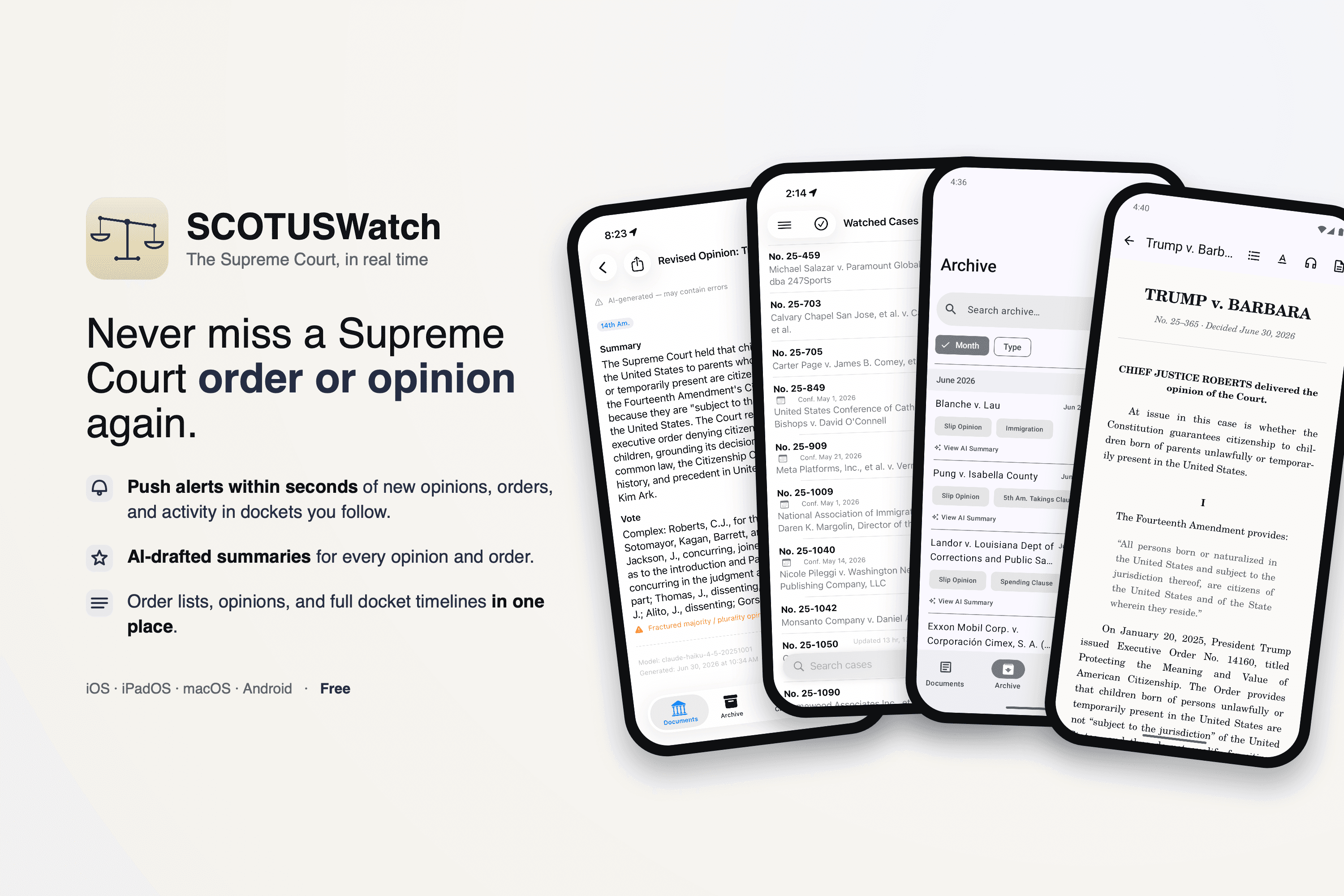
But I wanted more. So Version 2 — which came out in the Apple App Store and Google Play Store in time for June’s opinion releases — lets users watch up to 30 individual dockets. A Python script reads the docket numbers in an order list and the disposition (cert granted, cert denied, CVSG, GVR, etc.). That information is pushed to users' devices, which match the information to each user's list of watched cases, create a push notification for each case with a result, and update the app with the information (long before the docket updates).
This way, I don't have to know what cases any particular user is watching — that's all stored locally, in a private CloudKit database, or in the user's own Google Drive. Users can also view all the docket entries for watched cases and open the PDFs of petitions and briefs.
The last challenge to solve for Version 2 was push notifications when new docket entries post for watched cases. The Court sends emails, but only if you sign up and solve a CAPTCHA, and the actual new docket entry is a click, a scroll, and another click away. I still need one user to solve the CAPTCHA per docket, but now the Court's updates get sent to a central email account, which triggers a Python script to send a notification.
Devices match that notification to the user's watched-cases list, triggering a push notification and a docket update on the device. Tapping the notification takes you to the docket, where the new entry is at the top of the list.
What Vibe Coding Is Like
As I mentioned, I am not a developer. However, SCOTUSWatch wasn't my first app. I had used the AI access through Kagi.com to build My New Music, an app to check Apple Music for new releases from artists in my music library. And when I couldn't get a Python script to reliably check another court's website, I used that same AI access to make Vigil, a Safari extension that checks courts' websites. For SCOTUSWatch, I turned to Claude Code when I needed more help. And I’ve since used Claude Code to create Veyrn, an iOS and MacOS client for the open-source Vikunja to-do platform.
Vibe coding has been an interesting experience. I still have very little idea exactly how the code works, even after I had Claude write me a document explaining the code in plain English, which helped some. But Claude has no idea how the Supreme Court works, which can lead it to confidently state that it identified a problem and propose a solution, which it often starts implementing before I can hit stop and explain where it went wrong.
I've also learned enough through this process to recognize when Claude is making the same mistakes it has made before — and when to switch from Sonnet to Opus to solve more difficult problems or to plan out changes that cheaper models can then implement.
"Claude has no idea how the Supreme Court works — but I've learned enough to recognize when it's making the same mistakes it has before."
What Comes Next
The whole project is essentially costless to run, at least at the current scale of about 500 users. The Claude subscription is my biggest expense, along with registering as a developer for the App Store and Google Play Store. But my monthly operating costs are less than $1, which lets me make the app free — which is what I want.
I'm getting a lot of satisfaction out of having built something that solves a problem and actually works (even if I'm not entirely sure how). And I recognize that the Court could change its website or how it notifies about docket updates tomorrow, breaking (or "Sherlocking") the whole enterprise.
But until that happens, I'll continue with this project — tweaking the code when the Court does something novel (like the summary disposition in Abbott v. LULAC, which the app missed because I had no idea it should look for such a thing) and coming up with new features when I realize there's something else I'd like the app to do — like turning PDF opinions into HTML that’s easy to read on a phone screen or into audio files you can listen to, podcast-style, with distinct voices for each Justice (both features currently out in TestFlight and Open Testing, and coming to the app stores this Fall).
My hope is that this will prove useful not just for me, but also for practitioners, law students and professors, journalists, and Court watchers — no one should have to spend all afternoon refreshing a web page.